
Olympus E-M1X Review
If you are a regular reader of my blog for more philosophical musings, read no further. This is a technical geeking out overview of a camera. If that’s what you came looking for, read on…
I realise the future of the Olympus marque is uncertain at the moment with the sale of the imaging division to a third party; however, I’m going to assume a best case scenario that the brand will continue under new management and, perhaps, take off in a different direction that hadn’t been considered before. Regardless, the E-M1X exists and someone out there may be considering the purchase of one. I’ve had mine now since May 2019 and have been using it as my main workhorse camera after moving almost wholly over from a full frame Nikon system. In short, I would not look back. Despite a few qualms about minor things, it’s an altogether better setup for my needs. Most of what I'm writing about below applies to the Olympus system as a whole (I have several other bodies that I use in different situations); but little has been written about the E-M1X in particular as I think it was a head-scratcher when it was introduced; consequently it didn’t get much press or many reviews. I debated at the time whether to get it or the E-M1; I ended up going with the X as it did have a few features that the E-M1 didn’t (this has since been mostly remedied by the mkIII version of the E-M1 although the X still has something to say with a couple features and I do prefer the physical configuration of the X for most of what I do). Also, my dealer here in Sydney had a special going that included the pro flash and a 12-40mm lens with the purchase so, in a sense, I got the better body for the same price as the E-M1 (I’ve since added an E-M1 mkII as a backup body as well so can make a fair comparison here as well). I’ve had the camera long enough to make some observations about its use for anyone considering moving to M43 or adding it to his or her kit.
Overall kit size
This, I think, is the major advantage of M43. Upon switching from a full frame system, my whole kit size reduced by more than half. Yes, the body of the E-M1X is nearly the same size as a full frame camera, but if you have more than a couple lenses, the overall kit size reduction is significant. This can’t be overlooked for an event or travel photographer who must constantly schlepp around a variety of lenses to cover different situations. This becomes even more apparent when the smaller and lighter bodies in the system are considered as options. What I would have given when, a decade ago, I was traveling around the world with a heavy camera kit to replace it all with a couple of the E-M1 bodies and a few lenses that could have easily fit in a small bag.
Ergonomics
I’ve used or handled most of the major camera systems and this must be the most comfortable, well balanced body I've ever encountered. This is admittedly, heavily dependent the size of your hands and how you hold your cameras and move with them. But, for me, it’s just about perfect. It’s not so important with the smaller primes (and actually, the body looks slightly comical with some of the truly tiny M43 lenses) but it’s very well balanced with the longer zooms and fast primes. Indeed, the bulbous 7-14mm zoom really only feels comfortable on this body (though I’m assuming it would be a similar balance on the E-M1 if I had the grip attached to the bottom). Otherwise, Olympus have thought out all the buttons and knobs so well they seem like they’ve been placed in the most intuitive positions for ease of use. They’ve taken special care to, as much as possible, mimic the layout in both portrait and landscape orientation so that your muscle memory is the same in both situations. I can’t emphasise enough how very well thought out the design of this body is. The ‘in hand’ experience is beyond what can be conveyed on paper or YouTube. (Though, speaking of YouTube, be sure to watch Chris Eyre Walker’s excellent review of the camera.) It’s ridiculously overbuilt; there is absolutely nothing that hints at cut corners or points to something that one needs to watch out for in order not to damage. I’m not a hard user of my gear but would have no qualms taking this out into extreme environments (where I would no doubt give out before the camera).
Stabilisation
This, again, is the the standout feature in the Olympus system. It both allows one to use lower ISOs in a given situation and longer lenses with sharper results. I leave it active all the time when handheld and can better compose the shot with a live IBIS in the viewfinder. It’s also an uncanny aid when shooting video; I have had multiple occasions where it almost (but not quite) looks like I’m using a gimbal but I’m actually just holding the camera at arms length with the IBIS on. It’s certainly not a vlogging camera but, because of the mass and configuration, it makes for very good video camera handheld.
Battery and Power
The camera uses two batteries in a sled—which is great as that means the batteries are systemically interchangeable with all the pro bodies. However, I do wish they would come out with one large single battery that has even more output and endurance (also that battery might have a built-in USB-C port for charging). As there is no way to swap out one battery at a time, the advantage of having two in the body is a bit moot. Also, and I’m assuming this is something that can be updated in firmware, the camera drains the first battery down to zero then switches to the second. I wish that there was a way to tell the camera to switch batteries at a given percentage before that as repeated total discharges aren't great for the health of the batteries. I have to remember to rotate them or I just otherwise hardy ever use the battery in the #2 position and keep draining the first one down to nothing and recharging (I have six batteries though that I rotate between the E-M1 and the X so hopefully that’s not much of an issue).
Mounting
I immediately add the matching Really Right Stuff Arca plates to my cameras as I want to be able to use the bodies with quick release plates and the RRS plates are formed to integrate with the shape of the body when handheld as well. Also, I’m not a neck strap person and the RRS plates have a loop through for the Camdapter wrist straps (which are the perfect size for this body as well). The RSS plate does add just a slight bit to the height and weight of the body but it’s negligible compared to the usefulness of the mount.
GPS/altimeter metadata
At first I thought this was an extra that I would not have much use for; However, it’s really something to look back at the metadata of my images and see exactly where I was, at what altitude (and you can drill down to get the barometric pressure and all manner of other information as well). I’m sure this is mainly aimed toward people doing scientific research, forensics, industrial surveys or what have you but it’s interesting to have all that data recorded as a matter of course.
The Imaging Sensor
So, here is the big ‘but what about...’ conversation that I’m just completely over. For the record, I had two of the original E-M5 bodies with their 16MP sensors—and they were, wait for it, just fine. Actually, right now, I wouldn’t hesitate if someone called me up tomorrow with the offer to travel round the world on a travel shoot, to put these in a bag and use them for professional work. This has been talked to death but, truly, in almost all situations, one does not need the super high resolution sensors. I wish Olympus would just go off the rails and use some kind of sensor that maybe has a lower resolution but somehow has amazing dynamic range or colour fidelity (which are much more important) and just call foul on the megapixel thing. I do a lot of still life and would much rather have a sensor with a base ISO of 64 that gives me more reach at the lower end than the (currently) impossible call for a small chip that magically gives me a clean image at ISO 25,000. Their optics are superb and deserve to be paired with a unique sensor that offers up something different than just more resolution. Also at work, I have a camera from another manufacturer with a significantly higher MP count that, every time I press the shutter release, gives me files that are 3x the size of my OMD files. That adds up very quickly and I find myself having to cull through a bunch of large files just to save space on the server (this becomes even more of a consideration if you are using cloud-based digital asset management; I’m working mostly from home now and having to send up and down large jobs is tedious even with decently fast internet). I know this would take a re-engineering of the whole internal mechanism of the camera but I wish they would consider a square sensor to take advantage of the full image circle. I started my professional work on Hasselblad and actually prefer a square image; most or all of the optics have ‘wasted’ image area that could be used for a square chip to give a larger range of frame ratios and more imaging area. I would think, if that could be engineered, it might be a second wind for the format...which, of course, they would have to rename to micro1:1 or something but I would think it would be worth a go.
High-Rez Mode
I do use this but not extensively; most of my photography involves people so it’s not applicable in those situations. However, if I’m photographic something static, it does help sometimes to eke out just that little bit more detail (though, again, unless one is greatly enlarging the images, it’s often not worth the extra bit of time and effort to get the larger file. One thing it does do, more so perhaps than getting extra detail, is reduce noise in the image. I don’t know that it would make a difference or what all the computational matters are, but I wish one could turn on a similar mode at much higher ISOs (it’s limited to 1600 right now) just for the sake of reducing noise even if the resolution stayed at the ‘normal’ level.
The Viewfinder
I’m not a huge fan of the viewfinder; I do appreciate the better optics (compared to the E-M1) in it that make for a higher magnification. However, this just magnifies what I think is a rather so-so screen. It does have a high refresh rate which allows for quick movement with no lag or jitters. But I wish they had a display with a more colour depth and resolution. (Also, I know it would add even more to the size of the body, but these displays are advancing much faster than the life of camera bodies; it would be better if they make the viewfinder into a removable module that could be upgraded later or one could choose between viewfinders that were attuned to different needs. A sports shooter might need something different than a landscape photographer). That said, there is nothing particularly wrong with the viewfinder as it is but it’s not the camera’s strong point.
Optics
The lenses are just gorgeous both in build and optics; they are what sell the system for me. They are some of the best designs and builds of any lenses I’ve used (short of Leica M lenses, but that’s a different discussion and price point). However, they are just beautifully made regardless. I have the pro primes and they have the most gorgeous rendering shot wide open; the 17 and 45mm are especially notable.
Further Observations and Comments
Timecode jam sync: There seems to be all the necessary pro timecode features in the camera except…the whole point of timecode is to sync to other gear. I have a Sound Devices 744T that I use for sound recording; however there doesn't seem to be a way I can jam sync the TC output from the 744T to the camera without having to have an external device like a Tentacle Sync and laying down LTC on one of the audio tracks (it would be really useful to have a firmware update, if this is possible, where I one feed the Ambient TC out from the 744 into one of the audio tracks with a cable adaptor for a moment and jam it that way rather than having to have a separate third party device since it seems to have all the other technology on board.)
Graphic display: This is a minor thing but, when assigning control functions in the menu, a graphic of the body is displayed on the screen. This is quite helpful either in the heat of the moment when one decides to change something in the field or even just when one can’t quite remember which button is called what.
Video controls: in video operation, the vertical grip command dials are disabled. One can use the ‘Fn 1/2’ switch to change the operation of the top deck dials but I wonder if the lower dials could be enabled as well (for instance, I’ve set up to have f/stop and exposure compensation on Fn1 and the mic/headphone levels on Fn2; it would be good if, instead of having to click a switch, I could just make the lower dials the volume controls so I could simply reach down and adjust on the fly).
The HDMI port: Why the small HDMI port—like, really, why! There was all this real estate on the body of the camera and you gave us the smallest HDMI port as an afterthought? You built a camera that can take the most extreme situations and put a little connector in there that’s almost guaranteed to crap out somewhere a thousand kilometres from nowhere. Also, though again I’m hoping this comes in a firmware update, the output from that tiny HDMI is 8bit instead of 10. I’m using this daily in a professional environment, do keying with green screens and need to have the flexibility of that extra colour depth (though, that said, the high bit rate internal recording on the camera is excellent). Update on this October 2020; Olympus and Atomos have recently announced that RAW video recording will soon be available via a firmware update. I will purchase a Ninja V to do this as I think that’s a significant upgrade that bypasses any of the limitations of the lower bit rate internal recordings (and will probably, in some ways, be easier to edit though the files will be larger); still…the tiny HDMI port; alas.
Additional Fn button assignment: It would be good it we could dedicate a Fn button to flash exposure compensation. I’m often doing events or portraits and want to dip the flash down to fill. On my Nikons this is a dedicated Fn+dial combination but one has to go into the control panel to change on Olympus.
TTL Control: I’ve also purchased the Profoto TTL remote for the camera. The remote is on 2.4ghz; the camera has a 2.4ghz transceiver built in already for WiFi. PhaseOne cameras can control the Profoto system in-camera. As Olympus apparently have a some level of communication with Profoto, I wonder if the control could be coded into the camera body rather than having to have a separate transmitter?
More with USB-C: I’m also assuming that much more will come of the USB-C port (I’m already quite chuffed that one can charge the camera through it). It would be good if we could attach SSD drives to either back up files or record directly to external storage. I’m not sure what would be needed with drivers and such but audio support would be welcome as well. For instance, I have the RØDE on camera mic with USB-C; it would be useful if the camera could make a direct digital connection to the mic rather than have to go through A/D conversion.
Tethering: I shoot tethered a lot for my studio work; I wonder if Olympus are having any conversations with CaptureOne about adding support for the camera tethered? The Olympus tethering app actually isn’t all that bad in itself and one can set Capture one to watch folders but it would still be better to have all the action happening in one application (though this isn't saying much, Olympus have one of the better mobile apps as well; it’s nice to be able to be out shooting an event and then immediately post images to social media).
Conclusion
Those are my general observations; I hope that a mkII version of this camera does emerge as I feel that this body is about 90% ‘there’. Much could be improved in firmware updates as I’m assuming there is still significant untapped power in there with the dual processors and some of my issues with the camera are software and control based. Of course, a lot of the DNA from this camera was brought into the recently introduced E-M1 mkIII. I’m not sure, given the choice between today, that I would still go with the X as the smaller body does basically cover most of my needs; however, when I’m using a camera all day, especially with long lenses, the X is just wonderful to handle (if I were a sports or wedding shooter, there would be no question). I know decisions about the purchase of Olympus gear at the moment might be rather nebulous but I’m hoping that the M43 format itself has a future. It’s a well made tool and fits a variety of needs. Today, I’m going to film a piece to camera for a social media post then use the camera as a webcam for a webinar in the studio—and may also do some copy work of a painting to submit to the National Archive. I can easily segue between each of those scenarios with this camera without having to fuss. For me, that is worth the price of admission and all the other matters that people debate sort of fall by the wayside.
Fostex FM3 and FM4 Review
Ah, Fostex; I'm not sure I completely comprehend the manufacturing or marketing ethos of this company. To the best of my understanding, it seems to be something along the lines of 'Let's make a product that is pretty solid, has some good features, and appeals to a limited group of professionals. However, we'll just make version 1.0, only make it for about a year, then discontinue it and never speak of it again.'
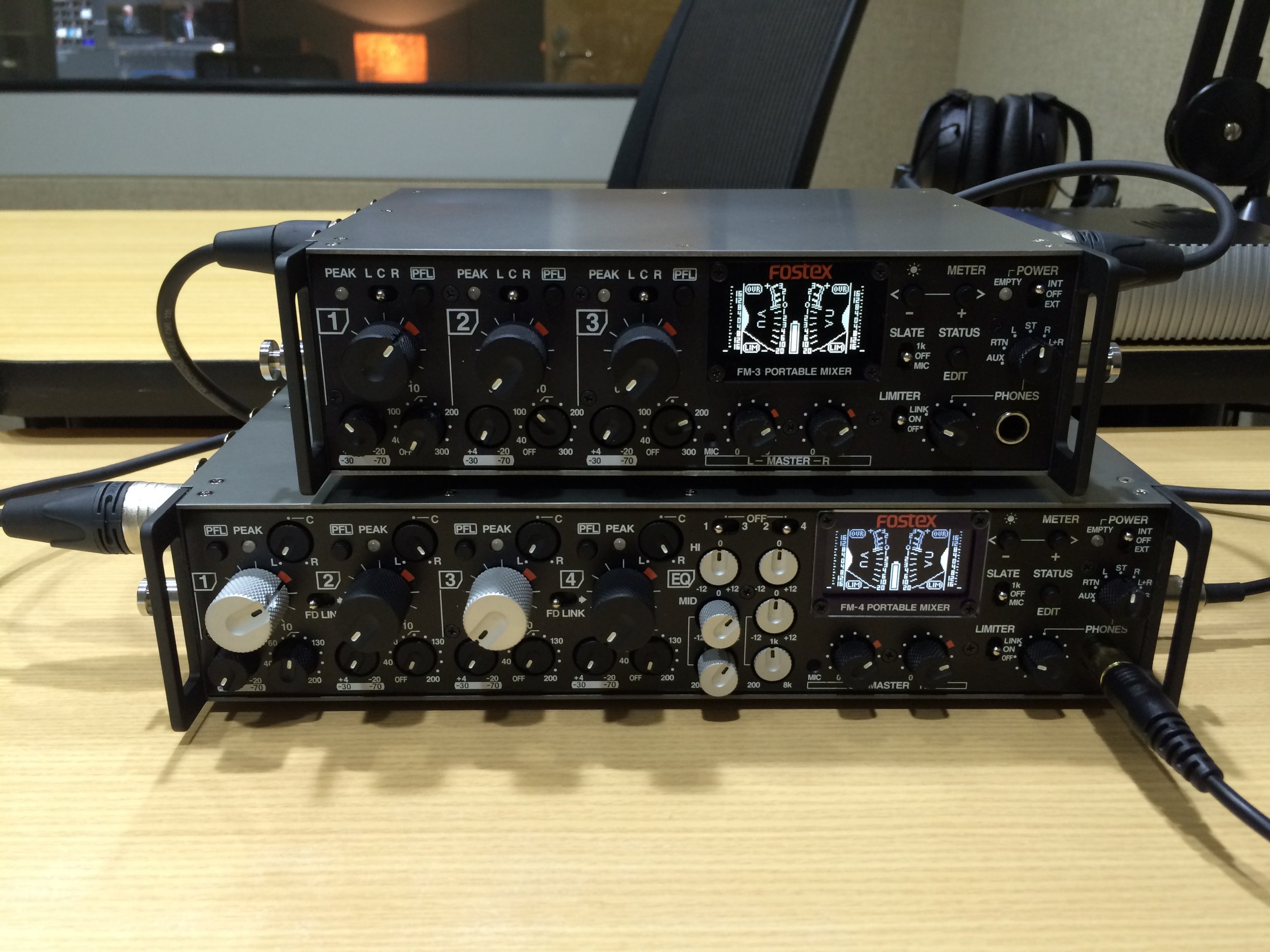
Between the exchange rates in Australia and having a good dealer here in Sydney, I've ended up with a variety of Fostex gear in my studio. I tend to do a lot of research prior to purchase, but it's often difficult to find much commentary online regarding Fostex equipment in use. So I thought it might be worthwhile to write a bit about my experiences with some of this kit. The first two items are the FM-3 and FM-4 field mixers (the FM-4 is from work; I purchased the FM-3 myself when the dealer had a demo unit at an unbeatable price).
Both units are physically and technically similar with a few significant differences. The cosmetics of Fostex gear has, in the past, been—distinctive; let's just say that functionality apparently won over aesthetics. That's not to imply their gear was not well built; I have seen Fostex equipment running along smoothly many years after the expected use-by date. But they took things up a notch with both these mixers. They are very well machined and put together (externally and internally). I expect many years of solid service from them; I take good care of my gear and don't work in extreme environments but I would imagine this kit would also stand up well to rough use as well.
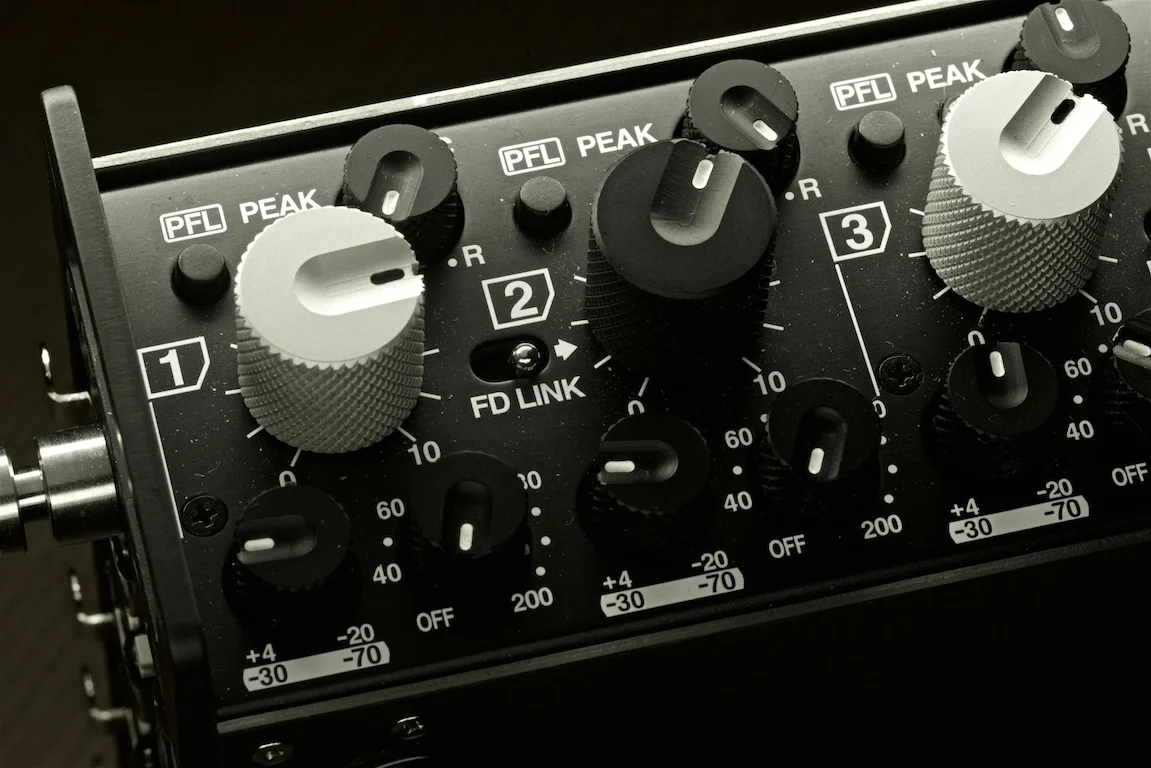
The layout is logical and easy to comprehend (though, granted, it's laid out like most professional mixers in this regard; if you have a basic understanding of signal flow, you'll be able to pick either unit up and have it working in a few moments). There are some 'set and forget' features in the on-screen menu; but most functions are modified by physical switches and knobs. I find this reassuring in actual use as I don't want to fiddle with menus in the middle of a live broadcast. All the controls are very well thought out with recessed dials to set and lock; the main gain and volume dials are well dampened with a useful tactile references (always welcome as I'm often working in poorly lit environments).
All the standard inputs are accepted through the three or four Neutrik connectors (XLR only not the XLR/TRS combo; I suppose if one dearly needed TRS the connectors could be readily replaced as they are a standard fitting). In addition to line level, dynamic, and P48 they've also included T-Power which is a pleasant bonus for professionals using the few remaining or older T-Power microphones. Note that both units provide a solid P48 feed to all mics. I have run these in the studio powering multiple large diaphragm mics at once with no issues at all. Granted, that's been with an external 12v power supply, but the internal battery also seems to provide adequate power for extended times. With dynamic or line level inputs, the batteries last all day.
On the subject of power, both units share a nicely designed caddy that holds 8 AA batteries. I have them loaded with NiMh rechargeables (there is an option in the menu to give accurate battery readings for either alkaline or rechargeable). The caddy is a welcome departure from other designs which required the user to remove a double handful of AA batteries from the unit itself. This is frustrating in the field in the middle of a recording or standing outdoors, etc. Instead, I have several loaded caddies in the bag and can just quickly exchange them. There is also a door on the unit itself that closes over the battery cavity if none is loaded. Quite tidy. Also, kudos for sharing the same caddy for both units. Normally though I'm using these units in the studio or in a location setup with power. In that case, I plug in a heavy duty 12v power supply. Both units have a standard professional four pin power connection (as well as a Hirose DC out for ancillary devices). I can't stress how much I wish more gear had this standard connector. It's a given, in professional environments, that one will connect and disconnect the power thousands of times over the life of the unit. I have had multiple failures of the little consumer barrel connectors that are too often used.


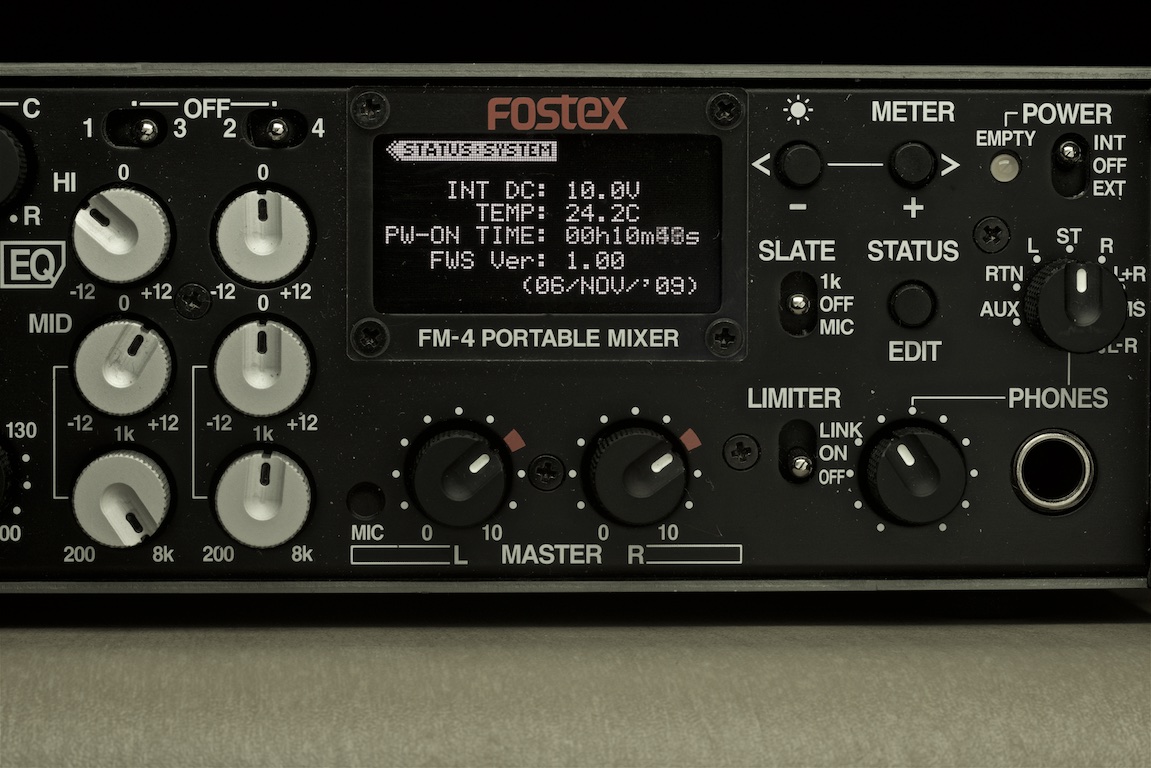
Moving round to the front, we have the control surface. This is similar on both units. Obviously the FM-3 only has three channels; however, it also loses continuous channel panning (has a L-C-R hard switch instead) as well as the tone controls of the FM-4. I find that I don't use the EQ much in the field unless it's in a live setting and I'll not have the opportunity to EQ in post. You can only EQ two individual channels at a time anyway so it's more of a problem solver than an everyday feature. Both units provide plenty of gain with all but the most dense dynamic mics. Any powered mic I've put through has come through with gain in spades. All channels are very clean and clear of any hint of hiss or distortion (I wouldn't hesitate to use either unit for detailed music recordings though most of what I do is speech).
Both units have the standard set of slate and monitoring controls (including basic MS mix in the headphones). They've included useful little things like a locking slate switch; instead of a momentary contact, you can turn on a 1k tone and keep it going whilst setting levels down the line. The headphone path is...adequate. It's built more for power than nuance; I can drive any pair of headphones I have (or two pair as there are two headphone jacks); however, it's not the quietest headphone amp in the world. This is something that I wish mixer manufacturers would not skimp on as I would like to hear exactly what I'm recording. I know there must be some trade off between power and detail for this though. My FM-4 did have some noise issue with the headphone amp and, after repair, it sounds far better (better than the FM-3). I have a feeling that the dealer here replaced a part with one having a superior spec to the original.
The menu system isn't often accessed as it's where one sets some level and routing parameters as well as safety features (one can turn off T-Power to avoid the risk of damaging dynamic or ribbon mics). The limiter on both units is quite good and can be set to a soft curve or something a bit more aggressive. The menu also shows the current routing diagram of the main bus; however, that's all apparent from the setting of the switches on the side of the unit so I'm not often looking at that.
Now, on the menu, here is my one significant gripe with the whole design—the display screen. It's too small, too dim, and too low resolution; there is just no getting round that. If it were just for the menu options, that would be fine. However, it's also used for metering—one of the most important visual interface functions of a mixer. You can switch between showing a full screen Left or Right or showing both L/R simultaneously. Also, it's good that they include both peak and VU metering, but having it all on the little screen all together makes for squinty viewing on the go. I'd really much rather have an old fashioned analogue VU meter with a basic LED bar of peak indication. It's also (again, in Australia) difficult to see this display in bright sunlight (as opposed to the SoundDevices mixer I have which I have to turn down to avoid lighting up the room indoors). This isn't an altogether write-off for the units but you should carefully consider under what circumstances you'll use the kit.



Both units have a comprehensive output section which makes them useful for a variety of routing needs. I'm often needing to route to different recorders and/or send a line feed for live sound at different levels. The FM-4 also allows one to send a 'straight' feed 4-in/4-out. I sometimes use it as a pre-amp head in the studio to send four line level outs to my audio interface when I run out of mic-pres (the FM-3 is just two channel out as there isn't space on the panel for individual outs for all three channels). I do have a five pin cable to daisy chain the units together. This feeds the output of the FM-3 straight into the bus of the FM-4 giving me seven channels mixed down to stereo or mono. I rarely use this but it can be a handy feature if I'm out somewhere and don't want to haul out a large desk mixer when I just need a few extra channels.
Altogether, both units are well built, sound great and are worth looking into if you can find them on the used market. I just wish Fostex had continued with the line and kept improving it. There is, internally, even a connection for a A/D convertor card. I checked with the dealer here who said that was a planned expansion that just never made it to market. I would love to have this as a mic-pre with AES out! Alas; not to be.
Pros:
solid build
clean sound and amplification
all expected connections for input/output and power
ability to cascade units for additional channels
very flexible options for varying output levels (balanced and unbalanced)
Cons (though these are mostly nit-picking except for the metering):
metering limitations
powerful but not nuanced headphone amp
series seems to have vanished off the catalogue
HHB FlashMic Field Test
This is an aside from everything else I’m considering at the moment but I feel compelled to write up a brief review of the FlashMic as there is not much information on it published and I’ve just worked with it in the field for a few weeks. Plus I’m processing all this deep personal and emotional stuff and need to geek out for a bit.
Prior to purchasing the FlashMic, I had HHB’s MiniDisc recorder; this served me well in all kinds of situations worldwide for several years. However, it is an over the shoulder recorder and basically requires a separate kit case for itself and its components. I’m travelling as light as possible now so a recorder built into the microphone is ideal (most of what I do is interview to mic anyway so the over the shoulder set-up is often overkill). Also, the MiniDisc recorder was damaged in flight on a prior assignment and was going to cost as much to repair as to replace so it was time to look for a new solution.
I have the DRM85, which is the omnidirectional model; most of my interviews are in somewhat controlled situations but it can be run and gun as well so I wanted the versatility of an omni and also hoped for less handling noise as well (more on that in a bit).
Handling and Design
The recorder has a ‘confidently solid’ feel but is not especially heavy (that said, if you are holding it at arm’s length for a 20 minute interview, the weight will be noticed; but that is the case with almost any microphone). It looks quite bulky in comparison to a standard interview microphone but I think most people would assume (if indeed they would assume anything) that it is a wireless mic. It does however, apparently raise an eyebrow at the airport security check; I was pulled aside at every point and hand searched with an explosives swab for it. It’s just out of their ordinary scope enough that they want to check it (and there was a moment in Frankfurt with security singing into it as if they were on a certain kind of television talent show…wish I would have had it recording).
I have only a couple concerns about the design; the USB and headphone ports are on the bottom end of the unit along with a rocker switch that controls most of the functions. I have a feeling that, of this were used in a ‘full-on’ news-gathering situation, that this area would be susceptible to damage or intrusion by soil or moisture. It would be good if there were some manner of rubber caps for the ports as there are on most professional cameras. The rocker switch, though I’ve no problems with it as yet, seems especially delicate. As it is necessary for all operation (it turns the unit on and off), any damage to it would be an end to the day. It is recessed, so they have physically protected it, but still I think it could do with a bit more robust design. I’ve no qualms about the membrane buttons on the side; they seem ready for anything (however, I do notice that the colour applied to each button is already beginning to wear off).
As this is a somewhat pricey bit of kit, it’s not something one wants to toss about or accidently drop. I’d like it if there were some provision for a wrist strap; I realise it would be difficult to isolate the strap connexion from the microphone to keep it from inducing handling noise. But I think I’m going to find myself fretting over the safety of the recorder where I should be focusing on an interview. I also find myself recording in dodgy situations sometimes on the street; as the recorder is just in one’s hand, it would make a perfect ‘grab and go’ item for an opportunistic thief (no doubt recording my protestations fading into the background as the thief runs off into a back alley).
As it’s an omni, I don’t think it’s especially susceptible to wind noise; nonetheless, I did purchase a dead kitty for it (it’s the Remote Audio Fat Cat; which fits, but it just fits with a bit of argument). It does have more handling noise than I had expected; one must be careful during recording not to futz about with it too much (it seems to have more handling noise than most dynamic cardioids; even the Sennheiser cardioid which I’m assuming the design is based on). This is just something to be aware of but I wish the capsule had slightly more isolation from the body. That said, there is good rejection of ambient noise; I recorded a couple very usable clips in the back of a cab in Mumbai and in a Land Rover out in the country. Also, as an omni, if one places it on a table, it becomes a quasi-PZM mic; I recorded a couple meetings that I knew would not be used for later podcasts but wanted for my records. I picked up acceptable audio by just sitting the microphone on a table in the midst.
Operation
The operation is fairly straightforward; once one figures out how to turn it on (which is not self-evident; it’s by a press and hold of the rocker switch on the bottom). There is a slight delay between a press for on and the recorder booting up and becoming ready for use (again, wish that could be a little less as I found myself wanting to catch a quick bit of conversation and waiting for the recorder to ready itself; that is going to be the case with most digital recorders now anyway. I think it’s just that I learned to do sound recording on a NAGRA which was going at the flip of a switch). As an aside, the manual that comes with the unit is beautifully done; whereas many manuals are either perfunctory or overly cluttered with jargon, HHB seem to have actual humans somewhere who are able to write lucidly.
They’ve managed to devise a fairly intuitive menu system with just a couple buttons and a one line display (this is supplemented with additional set-up software on one’s computer). One can define a number of pre-set recording scenarios; as I always record at the highest bit rate and etc., I didn’t use this much but see how it could be useful for working journalists. One minor niggle which I would imagine will change in the next model is that the display is sort of 1980’s vintage. It can be slightly difficult to read on the go; would be great if they could replace it with an OLED screen with sharp text (though, I would imagine that might be more of a power drain; I’m sure there was some discussion about this in design).
The overall operation could not be simpler; I was quite pleased to finally have something I could toss in a bag and then pull out at a moment’s notice for high-quality interviews. In the field, it’s often those impromptu moments that best capture the heart of the story and it’s a recorder like this that encourages that kind of work.
Sound Quality
In a word, excellent; it’s up with the best digital field recorders. Obviously there are recorders with super high bit rates and so on but a higher bit rate on this unit would be redundant. If anything it’s a bit too clear. The sound is, to my ear, bright; that can be brought back in post, but it would be nice if they could tweak the A/D converter slightly to encourage a warmer ‘NPR sound’. Clarity is good, but you’ll hear every lip parting and the hairs moving in your interviewee’s nose. I realise they are probably aiming for the most detail possible as the general use for this will be broadcast and the sound will probably suffer through several generations of compression.
Wish List
I like what HHB have done with the software interface but hope they take it a step further in future revisions. First, I wish the naming scheme for files was akin to that of digital cameras or that the software recognised the difference between already existing files and new ones. As it is, the naming structure is a straight _001, _002, _003, etc. If one erases files from the mic it begins again at _001; when one then attempts to upload new files into an already existing folder on the computer, there is a risk of over-writing the first set of files. Instead, one needs to organise each new set of files in a different folder and re-name them something sensible along the way. This doesn’t always work well in practice when one is rushing at the end of the day; it would be good if the software worked something like Apple’s iPhoto or the like and recognised the new and old, sorting them accordingly.
Next, I wonder if it might be possible to have the same features of the software for the computer in an iPhone app? This would be very useful for field use (and could even eliminate the need for a laptop on short trips). If a someone could upload, review, and send his or her clips via the iPhone, this would make a perfect field kit for a journalist (or podcaster or what have you). Also, taking it a couple steps further, might it be possible to connect the mic for live use via USB? This would add another level of functionality either on a laptop or phone for live to air spots.
There is a bit of handling noise if one marks a track during recording; could the recorder be equipped with Bluetooth for remote control of functions? For headphone monitors? I know Bluetooth only works within a few feet; but even headphone cables are a bit unwieldy coming out the bottom of the unit; might it be possible to go wireless with this? Or, could there be a complete WiFi interface between an iPhone of laptop to control, monitor, and upload the audio? I can imagine this would be useful for journalists at a press conference (and I know, for the seminar work I do, it would be great, as I’m often sitting in the audience and not able to access the recorder at the podium). That’s probably wishing for a lot, but still possible I think.
One thing that would be relatively easy to do is allow charging via USB; as I was wanting to pack very light for this trip, I opted to use lithium cells rather than bring along a charger (by the way, I used only two pair of lithiums on the whole trip; they seem to work a lot longer than noted in the manual!). It would be one less thing to pack if the rechargeable cells could be topped up via USB.
Also, I think this would be a great recorder for sight impaired people to use. The controls are straightforward; all that would be needed is some audio feedback via the monitors concerning what the mic is doing. This could be in the form of a quiet series of beeps or something like what Apple has done with their new Shuffle; a voice could say what track one is on, time remaining, etc.
Overall
Very pleased; I’m finally able to pack almost all my gear in a small backpack and go work without a load of cases or concern over technical issues. The FlashMic is going to be a constant companion on assignments now and, I think, will change the way I work and approach interviews (from the ease of use aspect as well as the fact that this is a non-imposing device I can pull out when someone might otherwise be intimidated by a big kit). I feel comfortable using it without headphones even (the AGC is excellent) so it is rather like a point and shoot camera except the results are always top notch. I’ll keep updating on its use here as I get out into different situations that test its abilities and limitations.
The interview below was recorded entirely with the FlashMic (as were most of the interviews on my Soundcloud account).
On Good Design
Here is an interview from Gestalten.tv with Dieter Rams on his design philosophy (which extends into a good life and living philosophy as well…we don’t need more things just better).
Bose Cold Comfort
About six years ago, I purchased a $300 pair of Bose Quiet Comfort 2 noise-cancelling headphones. I can never sleep on long flights and thought they would help (I’m not keen on noise in general). I’ve been pleased with them; they are not the best headphones ever but they perform as advertised (they allow one to listen to the often lame in-flight movie without cranking the volume up so far that deafness ensues).
Last week, I picked them up (literally, just lifted them off the table) and a small plastic piece that holds the headband split in half. These have been all over the world, but I take good care of things and they’re not abused. The broken piece is put together with screws and looked like it should be a fairly simple repair; so I contacted Bose customer service:
I have a QC2 headset; the plastic piece above the left ear-cup (the piece with the patent information) has just suddenly split in two. Is there a way I can order this as a part or would the whole thing need to be sent in for repair? It looks like it could be user-replaced (however, I suppose the cabling would have to be disconnected somehow in the process).
They replied:
We are sorry to hear about the issue you are experiencing with your Bose® QuietComfort® 2 headphones.
The headphones carry a one-year Limited Warranty when purchased from Bose or an authorized Bose reseller and are not factory or user-serviceable. We would like to assist in providing a solution for you…
I was confused by their response and assumed this was a typo:
...How do you mean that they are neither factory or user serviceable?
So they clarified:
...Thank you for responding with the requested information. As previously mentioned, the headphones carry a one-year Limited Warranty when purchased from Bose or an authorized Bose reseller and are not factory or user-serviceable.
You may trade your QC™2 headphones for a brand new set of QuietComfort 2 headphones for $100 (US dollars) or a brand new set of QuietComfort 3 headphones for $150 (US dollars); state and local taxes may apply. Replacement headphones come with a new one-year warranty.
Yes, according to Bose, there is no way to repair these headphones even though they work as they did when purchased. The only problem is that they won’t stay on my head with the small plastic piece broken. The only option I would have is to bin these and purchase a new pair:
So, thanks for the offer, but I can’t see the sense in tossing out a perfectly functional set of headphones because a small plastic piece failed on them (something seems quite amiss when a product can be repaired but is instead just sent to the rubbish). I will just try to superglue it back together instead. I have a pair of pro Sony headphones with fully replaceable components; why can you not say the same for a pair of headphones that cost three times as much?
I see now, from a quick internet search that this is a common problem with the QC2 (I had assumed this was just a freak failure) and that you have intermittently replaced the faulty product with a new one. I have been very pleased with these headphones and have disputed with several people the stereotype that Bose makes ‘overpriced boutique crap’ as my experience, to this moment, was positive.
They assumed that I was asking for a new pair of headphones to replace my broken pair:
...Now, I understand that $100 is a lot of money for a product that should not have broke. I do feel bad about the situation and want to see if we can keep you as a Bose customer. You have owned them for about 5-6 years according to one of your earlier responses. Is this correct? If so, I would like to pose a question to you. What do you feel would be a fair price to receive a brand new pair of headphones that broke after 5-6 years? Please keep in mind that I can’t give away brand new product for free and we certainly don’t want to devalue the product in any way. After all, we presume that the headphones have given you many years of enjoyment aside from the issue with them at this time. Please let me know what you fee would be a fair price to receive a brand new pair of headphones that broke after 5-6 years if you do not feel that $100 is an acceptable cost to pay for headphones which cost $299.99 and have functioned properly for most of the time you have owned them.
To which I replied:
My point is not that I would expect to receive a new pair of headphones; it is that, having spent $300 on a pair of headphones, I would think it reasonable that minor damage to them would be reparable. You tout your products as premium Hi-Fi gear and should back them as such. The clientele that your marketing targets are a step above the ‘disposable consumer goods’ demographic and expect a bit more return here. We have mechanical cameras that can stay in service beyond our lifetimes and 30 year old stereo gear in good repair. We aren’t expecting a pair of headphones to last forever; but, barring some catastrophic damage, they should last more than five. It’s not a matter of the money per se, it’s just a waste and the whole concept that things are apparently designed without the option of repair (you are, in effect, saying these are $300 dollar disposable headphones; I would challenge you to note this in the marketing that, after the warranty expires, should anything happen to the product, it must be replaced…as a consumer, what would be your response to this?)
So I glued and gaffer taped them back together; we shall see how that holds. We must get beyond this ‘disposable everything’ culture; we can’t afford it (at any level) anymore. This is a shame as I really don’t think that Bose makes ‘overpriced boutique crap’; but, as I said in the e-mail, they have to take this one step further and actually back their products with service.
As a postscript on this, I purchased a pair of Etymotic Research in-ear monitors last year and find they provide better isolation from noise than the Bose (plus they wrap up into the palm, have no batteries, and can be worn on the street).
Choices Choices
I’m looking for a new camera; it’s not for myself but for a new job I’m starting next month (will give more details on that when I sign on the dotted line). Despite the fact that I’ve worked professionally as a photographer and know the ins and outs of most of the different camera systems, I’m finding this a very difficult endeavour.
Photographers are notorious for “equipment obsession”; until the advent of digital cameras the discussions centred around lens specifications, film emulsions, and all the little bits and bobs that made up the chain from subject to print. Now we have the added complexity of digital; I spent a good amount of time yesterday in the camera store looking at various cameras (I’ve been given a bit of free reign on which system I choose since we are starting from a blank slate…which makes it even more difficult because that multiplies the choices exponentially). The good news is that most of the cameras on offer have higher specifications than the $30,000 digital cameras I was working with 10 years ago for 1/20 the price; the bad news is that those will be obsolete in a year. (Of course the thing with digital, with any volume of shooting, the camera quickly pays for itself…that’s why purchasing a $30,000 camera back makes perfect business sense if one is using $20,000 of film and processing a year anyway.)
I’ve not been equipment shopping for some time; my initial thought upon picking up most of the cameras yesterday was wunderplastik. Most of my professional work with with Hasselblad and Leica systems (imagine a group of Swiss watchmakers decided to build a precision brick oven and you’ll get something of the design ethos); everything else now seems rather flimsy. When one has a camera that’s been out in the pouring sea salt rain, freezing cold, blazing heat, dropped on the pavement, and still kept happily clicking away, it gives a bit of pause when handling what is basically a complex computer crammed into a plastic body. One camera I’m particularly keen on is brimming over with controls and has a huge screen that displays every conceivable bit of information concerning its status and exposure information. This is useful, as is the ability to immediately view the image one has just captured; however, how many times on my little digital camera have I stopped to look at the image I’ve just shot and missed the next one because I was gazing at the screen? The temptation is too great.
My Leica has exactly three controls: aperture, shutter speed and shutter release; there are two red arrows in the viewfinder that say give a bit more exposure or give a bit less exposure. Some of the greatest photos of the 20th century were made with a camera just like this (most of which did not have the helpful little arrows). For the majority of my work (on any system), I use only one or two focal lengths. The camera is way way over-engineered and, provided there is still film then, will outlast me. It is a very simple, well built instrument—which I have not yet learned to use.
Obviously, I know what it does; I spent several years in film school studying all the mechanics of photography (I was probably in the last generation of students that went through the laborious study of all the film and chemistry; it was just on the cusp of the digital era). I understand implicitly what the camera’s function is and how to operate it. But, as an instrument in the sense that a violin is an instrument, I’m still a novice at its operation. So I feel torn standing there in the camera store looking at all the new electronic instruments; it’s as if I’m starting up the oboe before really grasping the bassoon.
Cameras have become another mass-produced digital item that are obsolete as soon as they leave the store—and something galls me about that. Maybe it’s that I spent all this time learning about film and how it works and that’s no longer necessary. Or maybe it’s just the sense that I’m not really into disposable equipment (when one goes out to photograph with a solid block of metal, there is a certain mindset that comes into play). Mainly I’m thinking that, if Henri Carter Bresson could go his entire career with basically just one camera and a lens, why the heck do I need all this complexity?
I’m tempted to ask for a light kit and just use my camera for the time being; there is a digital Leica (though I don’t think they’ll drop £3000 to purchase one for me right at the start). But that’s probably not what I’ll do; I’ll put together a solid and flexible kit to cover the stuff I’ll need to cover. Of course, that will be thousands of pounds anyway…
I am aiming for simplicity and economy in everything; how can I bring that into this situation?
Solution for JVC Everio
The kind folks at Apple pointed me to a program that re-encodes video into other formats. It’s called VisualHub and it seems to have mostly solved my issue with the funky JVC file format. I thought it was going to take days to re-encode the video into something that Final Cut would recognise; however, after just a few hours of work this morning, all the video is sitting on my external hard drive. I ended up, for simplicity’s sake, saving it all as PAL DV; at this setting, the files were processed faster than real time (on my MacBook Pro).
JVC GZ-HD7 Field Report
For the past several weeks, I’ve used the JVC HD Everio (GZ-HD7) to record the experiences of the Xtreme Team in the Czech Republic. On previous teams, I had used either the Canon GL-1 or a Panasonic DVX-100A to cover the team. Here are some brief thoughts on my experience with this camera.
On paper, this looks like a keen little unit. It packs a lot of technology into a small package (this is important for something that one has to carry continuously for weeks at a time and was a primary consideration when I chose a camera). However, in practice (for what I was using it for) there were many shortcomings. First, this was a decisive moment sort of trip; unfortunately the camera is basically a little computer with a lens and, like a computer, it takes some time to boot up prior to operation. There were many instances where the shot was gone by the time the camera was operational. (I could not just leave the camera on all the time either, it seemed to eat batteries as well.) Secondly, it’s basically an auto-everything unit; however, the auto-exposure wasn’t very intelligent. There were a lot of associated ills to this. The auto white balance was confused by mixed lighting and the WB presets never seemed to quite be on target. Also, the dynamic range was atrocious; highlights were consistently blown out and shadow detail was almost non-existent. It also has very poor low-light performance. So, it’s no good in daylight because of the dynamic range issues and it’s no good in low indoor light (worse than most “consumer” DV cameras made in recent years). Again, in the particular situation I was using it for (which was fast changing documentary style shooting), it was poorly suited.
Basically, it needs controlled lighting or overcast days for good imagery. In some situations it would have been helpful to use manual exposure; I can tell where the exposure should be set for a scene. However, telling the camera where that exposure should be is another matter. To change either the shutter speed or aperture requires a couple presses of awkwardly placed buttons and a dial on the back of the camera (one has to take the camera away from one’s eye or make a separate motion that moves the camera away from a position of filming to make changes). Again, there were many times when I was trying to adjust exposure and the shot was lost.
Another feature that looks good on paper is the ability to shoot stills. This would be a great boon if it were not for the fact that the exposure is almost always wrong and the pictures look worse than images from a mobile phone (I honestly don’t think there was one image from the camera that I would consider usable). After a few days of trying this, I went home and picked up my five year old Sony camera (far far superior images and control over the process of making them).
There is no headphone output which…is somewhat inexplicable.
The optical image stabilisation seems to have no effect whatsoever; this is very important on a camera with almost no mass (it’s physically impossible to hold the camera steady). I did have a camera bracket that helped somewhat. But, still, there are many shots that are unusable because of shake. I’m not sure how critical I can really be here. We keep asking for smaller and lighter. However, the trade-of there is shaky images. I have used other small cameras though that have rather good stabilisation.
Then we come to the big issue that I should have anticipated from the start. I used the external DVD burner to backup files from the camera. This, on the surface, looks like a tidy little system for archiving footage in the field for later editing. No more tedious capturing of footage in post. Everything is already stored as distinct data files for the computer to access. However, my computer can’t access them; or, rather, I can open the files in QuickTime, but Final Cut doesn’t know what to do with them. For some reason, JVC decided to use some proprietary file format rather than a standardised one. So, in order to edit them, I have to re-encode them into another video format. This takes about five minutes for every one minute of video, which, of course, rather negates the time I would have saved capturing footage. There is also some related issue with the interlaced video; it seems especially interlaced. It’s as if someone thought that interlacing might be a really artistic way of interpreting motion and cranked the thing up a couple notches.
A word of advice: Do things simply and well. I should have chosen a not really the coolest latest thing on the scene camera that would have fit the task without fuss. (In that respect, I think the Panasonic DVX cameras are just about the best DV cameras ever made; yes, they are bigger and heavier. However, the image quality is actually better and they get the shot. The most important thing is actually getting the image onto tape. I’d rather have the shot on tape with a few less pixels to count that miss it with the coolest camera around.)
This points to a larger concern with how devoted we are to the latest and greatest gadget (photographers are especially prone to this malady). My film camera that was designed 50 years ago may not have all the neat features of something just off the shelf, but I know how to use it intuitively and can make pictures with it. Features and pixels are irrelevant if the photo is missed or poorly made because the “interface” gets in the way.
Waste II
Though I worked for a company that sold large-format inkjet printers, I really never considered the (somewhat taboo) subject of inkjet cartridge refills. Have you ever wondered why printers are so inexpensive? It’s because the money is not made on the printer itself; it’s all in the subsequent purchase of ink!
I have an oddball Lexmark printer left behind by the previous tenants; as I was unable to find a replacement cartridge in town, I wound up in a shop that refills old ones. Somehow, and I can’t really place why, this sort of thing always seemed rather shady to me. It was like trading in your pillows when you tire of them or filling up nearly empty toothpaste tubes (wouldn’t that be a cottage industry). This is partially because I once spent a great deal of time explaining to clients how they must replace the inks in their large format printers with cartridges from the manufacturer (and this does have some merit when one is printing display art for archival purposes as some inks and papers are specifically matched; off-brand ink could also flummox up the print heads). However, I’m printing drafts of text from a clunky old printer. I’m not going to need any sort of super quality or archival stability.
Consequently, I got the cartridge refilled, popped it back in, and it prints like new. This can be done several times at a significant cost savings (less than half the price of a new cartridge; though, even at that price, the people doing this are making a significant profit. These little canisters only hold one or two-hundred ml. of ink. If I were doing a whole lot of printing, I would probably buy the ink in bulk and inject it myself). Not to mention it’s one less thing in the trash (note that most office supply stores have drop-boxes for recycling ink and toner cartridges, some even offer a credit toward purchase).
The most sensible thing, though people have a hard time thinking through this, is to spend a little more for a well-built printer with large ink capacity at the outset (that is, if you are doing a significant amount of printing). Epson’s mid-priced pro level printers will last for years (they sold the 3000 for something like a decade and it just sat there sipping ink; there are, no doubt, thousands of them sitting around still sipping ink). The $100 ink-jet on special might look tempting at first; but you will eventually end up spending far more in consumables.